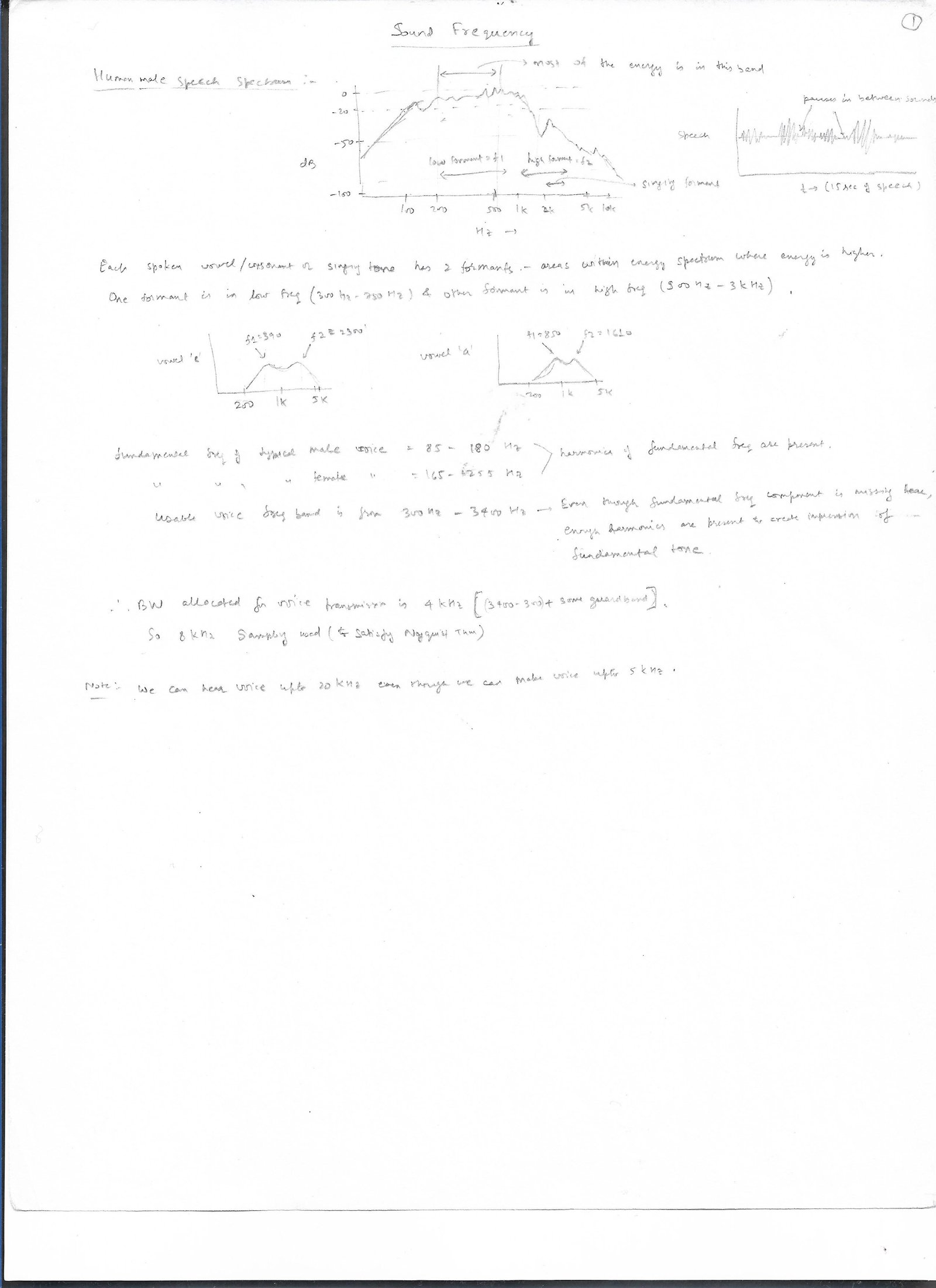
Audio: Audio can be music or human voice. Depending on compression technique...


Write about audio compression techniques and audio signals, processing ...


Audio Voice (Speaking + Hearing):

Waveform of Human voice :


Basics of Images and Videos:

Images: Images can be black & white or color. These are formed by having different light intensity at different pixels of an image. Black & white images just have varying degree of white light at different pixels, while color images use varying degree of primary color (RGB) lights. We store every pixel value light intensity as a decimal number going from 0 to 255 (if 8 bits used).

For black-white picture, each pixel only needs to store 1 number of how much bright that pixel is (0 for total black and maximum number for total white).

For color images, we need to store 3 numbers for each pixel (as each pixel will need to store all 3 primary color info). We can either store color info for each pixel as RGB directly, or we can store it as having 2 portions = one portion storing black/white info, while other portion storing color info. When stored in this 2 portion format, instead of storing as RGB, we store it as Y'CbCr (aka YUV or YCC). However, this image in YUV ultimately needs to be transformed into RGB for display by the monitor (as RGB values are what are used by all modern display devices). The reason, we still use this 2 portion format is because everything being transferred to your TV on air, or from your Blu-ray disc is being sent in YUV. Reason for that is that these high definition video transfer require a lot of data, and YUV can be compressed lot more than RGB, with no noticeable loss in quality. If it wasn't for this bandwidth reduction, we would just stick with RGB, since it's simple and gives accurate images. Anyway for YUV, te 2 portions of image are:

1. achromatic (without color) portion: This is called luma (represented by Y'). It represents the brightness of an image, i.e black and white portions of image. Black means no brightness, while white means full brightness. Luma is the weighted sum of gamma compressed R'G'B' components of color video - primes on RGB denote gamma compression. Y' = a*R' + b*G' + c*B', where a,b,c are coefficients b/w 0 and 1. These coefficients vary, and there are different Y' corresponding to different coeff. It's hard to get correct achromatic info by using a certain coeff, and so different standards use different coeff (lot's of debate on what are the correct coeff to use). Weighted sum of linear RGB (w/o primes), is called relative luminance (or just luminance or Y), and is used in color science. Y = a*R + b*G + c*B. We actually want luma to represent luminance exactly, but it's not possible as errors in chroma affects luma.

2. chromatic (color) portion: This is called chroma. It represents the color, hue, phase info of an image. It is further separated into Cb and Cr components, which are the blue and red components respectively. Jut like luma, Cb and Cr are also some linear combination of R,G,B. Just like luminance vs luma, chroma is different from chrominance.

In an image, luma is typically paired with chroma. Human eye is more sensitive to luma than to chroma (i.e it can perceive black/white differences more easily than color differences). This characteristic is used to do chroma subsampling. The idea is that instead of having unique color for each pixel, we duplicate color for every 2 pixels or every 4 pixels. Then the bandwidth requirement for color goes down by factor of 2 or 4. This is how chroma subsampling is rep:

J:a:b => subsampling rep in this format where we have a grid of pixels: J pixels wide by 2 pixels high (i.e J*2 pixels in total), out of which there are "a" samples of chroma (CbCr) in 1st row of pixels (top row), while there are "b" changes of samples of chroma b/w 1st and 2nd row. NOTE: luma is not sampled, and is present for each pixel.

These are common subsampling ratios:

4:4:4 => refers to no sampling, i.e all pixels are rep by their unique CbCr. Similar to RGB (as Y'CbCr were transformed from RGB, so if each pixel retains unique CbCr, then in essence, all color info is retained for all pixels). This mode is enabled when TV are used as monitor, since then text starts appearing blurry, if any subsampling done.

4:2:2 => The chroma components (CbCr) are sampled at half the sample rate of luma. Two adjoining pixels in horizontal line (total 2 pixels) repeat same color.

4:2:0 => The chroma components (CbCr) are sampled at one fourth the sample rate of luma. Two adjoining pixels in horizontal line and 2 pixels below it in next line (total 4 pixels) repeat same color. So, resolution for color is reduced by 1/2 in horizontal dir, and 1/2 in vertical dir. This most widely used in 4K transmission since BW reduction of 1/4th results in almost no loss in quality.

Each of the pixel luma/color info is called a channel. So, for RGB, the 3 channels are R,G,B. For YUV, 3 channels are Y,U,V.

Image Formats:

Images may be in raster or vector form. Both types of format need to be rastorized (converted into pixels) to be displayed on a monitor. Raster image use bitmap which represent a rectangular grid of pixels, with each pixel's color being specified by a number of bits (for ex color may be 24 bit, with 8 bit for Red, 8 for green, 8 for blue). These grid of pixels forms a colored image. It can be stored as file (bitmap image file), or in computer's video memory for display on monitor. Modern displays are bit mapped, where each on-screen pixel directly corresponds to a small number of bits in memory. Vector format store images as geometric description, and will need to be converted into a grid of pixels for display on monitor. These are not so common today. Data storage in an image can be pixel oriented (color values for each pixel are clustered and stored consecutively) or planar oriented (color values for each pixel are stored in separate planes, so in essence each color component is stored as separate array).

An image file format may store data in uncompressed or compressed forms.

Compressed images: 2 compression algorithms = lossless and lossy.

1. Lossy ones lose info when compressed, so that when reduced images are enlarged, they are not a exact replica of original image.Lossy compression method most popular is DCT (discrete cosine transform). A DCT is similar to a Fourier Transform in the sense that it produces a kind of spatial frequency spectrum.

2. Lossless ones preserve all the info of original image even in compressed form. However, lossless images are larger in size compared to lossy ones. LZW is most popular Lossless compression method.

A. JPEG (Joint Photographic Experts Group) = stored as jpeg or jpg extension. Most popular image format. It's lossy. It can support 8 bit grayscale and 24 bit color image. JPEG image consists of sequence of segments. Codecs are required to encode/decode jpeg image. These are the basic steps of encoding: (detailed example here on wiki: https://en.wikipedia.org/wiki/JPEG)

  • Image is converted from RGB to Y'CbCr with Y' (luma) representing brightness and CbCr (chroma) representing color. How to convert from RGB to Y'CbCr is specified in JFIF standard.
  • Resolution of chroma is reduced by factor of 2 to 3, since eye is less sensitive to fine color details than to fine brightness details.
  • However, some implementations do not convert, and instead keep RGB itself, which results in less efficient compression.
  • The image is split into blocks of 8×8 (for 4:4:4 or no subsampling. For 4:2:2, it's 16x8 block size, as chroma is repeated for 2 pixels) for each channel, and for each block, each of the Y, CB, and CR data undergoes DCT. These blocks are called MCU (minimum coded unit) or macroblocks. After DCT, data is adjusted to bring it in valid range (i.e for 8 bit, all values must be within 0 to 255)
  • The amplitudes of the frequency components are quantized. Quantization is the process of dividing each value of DCT with a constant, and then rounding it. This causes most of the high freq components to be rounded to 0, and remaining to become small +ve/-ve numbers, which may take fewer bits to represent. Rounding operation is the only one where lossy operation is performed. A quantization matrix is used (as specified by JPEG), and this matrix controls the compression ratio.
  • The resulting data for all 8×8 blocks is further compressed with a lossless algorithm, a variant of huffman encoding
  • Decoding a JPEG image consists of doing all the above steps in reverse.

B. GIF (graphics interchange format) = because of it's simplicity and age, it's very popular. However, it can only support 8 bit color image. GIF is patent free now, as patents have expired.

C. PNG (Portable network graphics) = it was created as a free, open-source alternative to GIF. 

Ex: For a 3 Mega Pixel camera, with 24 bits/pixel, to store the picture in raw format would require 3M*24bits=72Mbits/8=8MB of memory. However, in stored in jpeg format, it can be reduced in size anywhere from 10X to 100X, depending on quality loss acceptable. A size of 0.3MB in compressed format, offers pretty good quality.


Video:

video is basically a series of still image frames. It contains both spatial (within same frame as in still image) and temporal (in time) redundancy. video can be more effectively be compressed, since successive images in video differ by small amounts, so only the relative differences in successive frames can be stored. spatial compression is called intra-frame (within a single frame) compression, while temporal compression is called inter-frame (across multiple frames). Temporal compression is possible for cases where frames move in a simple manner, so that short commands can tell the compressor to just shift, rotate, lighten or darken the copy. However in areas of video with more motion, more data has to be stored to maintain quality. Various prediction techniques are applied to predict data for new frame. Various filters can also be applied to both encoding and decoding to remove soften blurring effects and to further improve compression. Varyimg bitrates are used for encoding/decoding depending on whether more bits or less bits need to be stored for that sequence of frames. I-frames (intra frame or baseline jpeg images) and P-frames (predicted frames or frames computed from I-frames) are names commonly used in video formats.

video is almost always stored in lossy format. Very high compression can be achieved via this. If we store 1 sec of HD video (1280 columns x 720 rows = 921.6K pixels = approx 1M pixels) @ 30frames/sec with 24 bit/pixel, it would need 3MB*30=90MB/sec of video. However, if each frame is compressed, and assuming that subsequent frames contain no new data, it can be compressed to atleast 10X or 9MB/sec. 1 hour of such video would require 3600*9MB=30GB of space. If you look at DVD, they store 2 hours of movie in 4GB of disc. Their transfer rate is 1.5Mbits/sec. That implies that each frame is compressed to more than 100X, and then predicted frames use very little data xfer to predict new frames.

various video coding standards emerged from 1980's. Few of the most popular standards shown below:

1. H.261: One of the first video coding standard was H.120 created in 1984, which was based on DPCM (differential pulse code modulation). It wasn't popular, as it's performance was poor. Then H.261 standard was developed based on DCT lossy compression. It proved to be very popular and a precursor to subsequent video coding standards as H.262, H.263, H.264/AVC and H.265/HEVC.

2. H.262: aka MPEG-2 Part 2, as it was developed by MPEG (discussed below).

3. H.263: developed as part of MPEG-4 standard

4. H.264: developed as part of MPEG-4 Part 10 standard for video compression. Also known as AVC (advanced video coding) or MPEG-4 Part 10. It's the most commonly used video compression standard, and supports resolution upto 8K UHD. All streaming video such as netflix, etc use this video std.

5. H.265: developed in 2013 as part of MPEG-H Part 2 standard for video compression. Also known as HEVC (High Efficiency Video Coding) or MPEG-H. It's just an extension of H.264. It offers much more data compression than H.264 for same video quality. It is mostly targeted for high resolution video upto 8K.  It's competing with royalty free AV1 coding. NOTE: all the above standards require royalty, except whose patents have expired.

6. AV1: Developed as open and royalty free alternative to MPEG by Alliance for Open Media. It was extended from VP9 developed by google, which itself was extended from VP8. VP10 is successor of VP9, but AV1 was started in parallel. AV1 is intended for use in HTML5 web video.

Audio + Video: Most of the video that we watch has associated audio with it. So, files for storing video consists of container: it contains video data in video coding format, and audio data in audio coding format. There is also some other data as metadata stored in the container. However, there is no uniformity as to which audio/video format is there based on file extension. Windows media player (.wmv), flash video (.flv) container have well defined video/audio formats they support, while more general container types like AVI (.avi) and QuickTime (.mob) can contain audio/video in any format, making it hard for the end user to determine what codecs to use to play that file.

FFmpeg is a free software, whose project libraries have wide support for lots of video/audio file formats. Free open source player, VLC media player, uses ffmpeg libraries, and so can play almost all video files.

MPEG (Motion Pictures Experts Group) was established in 1988 by various companies. It defined standards consisting of different parts (i.e video compression, audio compression, etc). Various standards developed by it were as follows:

MPEG-1 (1993): limited to 1.5Mbits/sec as the lowest bitrate, but can support upto 100Mbit/sec. It compresses video to 26:1 and audio to 6:1, w/o excessive quality loss. Used on video CD (VCD). It introduced popular MPEG-1 Audio layer III (MP3) audio compression format, after introducing MP1 and MP2 formats earlier. It supported only 2 channels (stereo) for audio. For video compression, it was based on H.261 standard. All patents related to MPEG-1 expired in 2017. So, codecs for MPEG-1 can be developed royalty free.

MPEG-2 (1995): based on H.262 for video compression and mp3 for audio. It also introduced AAC audio coding std. More ever, it allowed coding of audio programs with more than 2 channels, upto 5.1 channels.

MPEG-3: found to be redundant, and so merged with MPEG-2 standard.

MPEG-4 (1998): MPEG-4 includes more advanced compression algo, resulting in higher computational requirement. It's the most popular video std. It consists of several standards (called parts, i.e MPEG-4 part2, MPEG-4 part 10, etc). MPEG-4 doesn't define a single audio/video compression std, but allows one to choose amongst various profiles. It has a complex toolbox to perform wide range of audio compression from low bit rate (2Kbits/sec) to high quality audio (64Kbits/sec). Similarly for video compression. MPEG4 was initially targeted for low bit rate video communication, but was later expanded for HD content via Advanced Video Coding (AVC) used in Part 10. MPEG-4 part2 codecs are used in DivX, Xvid, Quicktime, while MPEG-4 part4 (advanced video coding, or MPEG-4 AVC) are used by Nero, HD disc, Blu-ray disc, etc. Part 10 is based on H.264 video compression. It also standardized DRM (digital rights management). MPEG-4 contains patented tech, so royalty fees required.

Containers: These standards above were put in containers by that name.

MPEG containers: So, video files based on MPEG-1/MPEG-2 were put in .mpg or .mpeg container, MPEG-4 in .mp4 or .m4v or m4p, etc.

Flash containers: Adobe Flash video format (.flv) uses MP3/H.264 for audio/video, but newer format (.f4v) have Adobe audio/video format, and is de facto std for web based streaming videos.

Real Media containers: Real media container (.rm) uses proprietary video and audio by RealNetworks, and can be played by their video played called RealPlayer.

Vob container: (.vob) most commonly seen in VIDEO_TS folder of DVD contain MPEG-1/MPEG-2 video and MP2/AC-3 audio.

WebM container: It uses VP9 video and Opus audio in *.webm container. It is the format served by youtube. VP9 was the format developed by google and is royalty free.

Flash Memory:

flash Memory is non volatile memory used to store data. In contrast to SRAM and DRAM memory which are volatile (lose data when powered off), flash memory retain data. Examples would be your USB Memory stick, SD memory card, SSD, etc. Note, Hard drive (HDD) stored data using different mechanism by using magentics (similar to CD/DVD technology). These are going out of phase and not worth pursuing anymore. Flash memory have virtually replaced these.

The only problem with Flash memory is that their wrt speeds are slow, as they have to use elevated voltage to program the bits of memory.

There are 2 kinds of flash: NAND type and NOR type. NAND is the one that is getting more popular.

NAND Flash Memory:

An intro paper on Nand memory:

https://www.longdom.org/open-access/nand-flash-memory-organization-and-operations-2165-7866-1000139.pdf

There is an organization called "open nand flash interface" (ONFI), which provides spec for Nand Flash i/f as to what pins they should have, speeds supported, cmds, reg, etc. All Nand flash manufacturers adhere to this spec, as they are all part of this org. Big companies which are members of this org include Intel, Micron, Hynix, etc. ONFi spec started from version 1.0 in 2007, and is currently at version 5.0

this is their spec link for different ONFI versions: http://www.onfi.org/specifications

ONFI 4.1 spec is what most manufacturers have their Flash chips based on, that is what we'll refer to: https://media-www.micron.com/-/media/client/onfi/specs/onfi_4_1_gold.pdf

Data interface types: ONFI 4 spec supports four different data interface types. These 4 i/f are supported on the same chip for backward compatibility. Early Flash memory chips supported SDR, and then grdually started supporting DDR with faster and faster speeds. SDR refers to single data rate where data is transferred on only 1 edge of clk, while DDR refers to dual data rate where data is transferred on both edges of clk each cycle. So DDR data throughput is doubled compared to SDR. The 4 Data interface types are:

  1. SDR,
  2. NV-DDR,
  3. NV-DDR2
  4. NV-DDR3. 

They have different speed, timing, voltages, etc. Details are in ONFI doc.

These are some of the aspects of different data interface:

Data i/f VCCQ                
SDR                  
NV-DDR                  
NV-DDR2                  
NV-DDR3                  


Nand reliability:

There are many noise sources in flash Mem that can flip the state of a bit. There are many techniques employed to improve the reliability of Nand flash. Some of these are:

1. ECC (Error correcting code): ECC is used heavily to correct these errors. There's a large area devoted to ECC.

2. Write leveling: Bitcells wear out after a certain number of writes. So, write leveling is done so that bits which are being less written are spread around so that they are written more.

3. Many other misc techniques.


Basics of Nand Flash:

Target: A device contains 1 or more targets, where each target is controlled by 1 CE_n (chip Enable) signal. 

LUN (Logical Unit): A target is organized into one or more Logical unit called LUN. A logical unit (LUN) is the minimum unit that can independently execute commands and report status.  Specifically, separate LUNs may operate on arbitrary command sequences in parallel. A LUN contains at least one page register and a Flash array. The Flash array contains a number of blocks. Each block contains a number of pages.

Page: Unlike most memory technologies, NAND flash is ordered in pages which are written and read as a unit. The elementary unit of operation for a NAND Flash device is one page of data with control commands of the whole block (multiple pages). Therefore data can be written only to one page at once. As shown in Figure 5, a page is defined as cells linked with the same word line. This is the smallest programmable unit physically made up of a row of cells.  A page is the smallest addressable unit for read and program operations. Erase takes place on a block basis. The page size is typically 2 or 4 Kbytes,

Block: As explained above, a group of pages is called a block. A block typically contains of 32 or 64 pages (has to be a power of 2). A block is the smallest erasable unit of storage. The reason for this is that all the NAND strings  share  the  same  group  of word lines that are erased together.  

Plane: The  NAND  Flash  memory  is  composed  of  the  blocks  of  pages,  which  could  be  grouped  into  a  flash  plane.  Depending  on  the  kind  of  device,  planes  are  in  principal  mutually  independent.  A  single  plane  covers  local  buffering  for read and program data, and can process operations in parallel.

Nand operations:

NAND flash devices carry out three basic operations of rd, wrt and erase.

  1. program a page: During  the  page  program  operation,  a  page  is  written  into  the  data  register  and  then  programmed  into  the  memory  array.  First  the  page  address  and  the  command  word  are  moved  into  the  device  followed  by  the  programming  data.  
  2. erase a block: Flash  memory  allows  only  two  states:  erased  and  non-erased.  A  given bit of data can only be written when the media is in an erase state. When data is written into, the bit is considered dirty and unusable for other write operations. A write operation in any type of flash device can only be accomplished on an erased unit and so a write operation must be preceded by an erase operation. In the erase state, a byte can be either all zeroes or all ones depending on the kind of flash device.
  3. read a page:Bits  in  a  flash  cell  are  read  by  changing  the  voltages  on  rows  and  columns  of  cells  followed  by  assessing  the  results.  In  a  page  read  operation, a page is moved from memory into the output data register.

These operations shown above are carried out in steps. In general, these are the steps:

  1. 1st step, cmd is sent out on Data lines,
  2. 2nd step. then row/col addr are sent out on data lines, Row addr is used to address pages, blocks, and LUNs. The column address is used to access bytes or words within a page, i.e. the column address is the byte/word offset into the page. Some op like "block Erase" require only col addr, so only 1 cycle addr issued. But some ops require both row and col addr, so 2 cycles needed with col addr issued in 1st cycle and row addr in 2nd cycle.
  3. 3rd step. Finally,  the value to be read or written is put on data lines. 


NOTE: In a NAND Flash device read and program operations take place on a page basis rather than on a byte or word basis like NOR Flash. This dictates the need to have the size of data I/O register equal to the page size.

NAND Flash memory is controlled using set of commands, these sets  of  commands  differ  from  memory  to  memory.  There  are  many  commands,  some  are  universal  to  all  NAND  Flash  manufacturers  while some commands are manufacture specific and supported only by a  few  devices.  According  to  the  Open  NAND  Flash  Interface  (ONFI)  Standard there is a list of the basic mandatory command set. The most common  commands  are   ́program ́,   ́read  data ́,   ́erase ́,   ́reset ́, etc.


Timing diagrams: Attach hand written notes


Dental List:

You can buy a lot of dental items for almost free, as there's always deals abounding.

ToothPaste:

Walgreens has deals on Toothpaste almost every month now (since 2021), where they have these on sale for free after rewards.

Dental Clinic: You almost always get free ToothPaste and ToothBrush from your dentist who you visit twice a year. Of course, the toothpaste are sample units, so they are small.

ToothPaste:

cashback sites

Now comes the best kept secret, cashback sites. Whenever you shop online and buy something from an online store, the merchants pay out commission to whoever referred you to that site. So, if you used google search to find an item, and used the link from google search engine to go to that merchant's website, and bought $100 worth of item, than that merchant pays google anywhere from 1% to 20% of the sale to google as their commission. How does the merchant know about who referred you? Well, there is referrer id or something like that when you click on the link (in the url of the merchant), that says that this link came from google. Of course if you go on your own, then the merchant doesn't share the commission with anyone, nor do you get any reduction in price. So, merchant wins big in this case !!

It would have been nice if google or yahoo or some of these search engines shared some of the earned commission with you. Unfortunately they don't. Fortunately, there are other websites that share their commission with you. You can visit these websites whenever you shop online, and click on the merchant's websites from these cashback websites. These cashback websites end up giving 50% or more of their commission to the customer, which adds up over time.

These websites give you cash back anyhwhere from 1% to 20% of the purchase price. The only requirement is that you access the online merchant website through the link posted on these cashback (CB) websites, your cart must be empty at time of purchase and purchase should be completed within an hour or so. cashbackholic lists all the cashback websites for a given merchant, so you can use this website to decide which one is giving you the maximum cashback.

UPDATE 2025: Better than cashbackholic is cashbackmonitor as it shows historical cashback too => https://www.cashbackmonitor.com

Two of the popular and reliable CB websites are Ebates (aka rakuten)  and topcashback . These websites explicitly state how much CB you’ll be getting, along with the exclusions that apply. So use these for any merchant only after reading the fine print for exclusions. Many other websites do not list all their exclusions, but won’t pay you later because it was an excluded category as per their internal rules. Ebates and topcashback are very explicit in listing all their excluding, so if they haven’t excluded a category for cashback, means you will get cashback for it. I personally never had any issues with either of them. One other thing to note is that CB appears on your portal within 24 hours for both of these websites (for most of the merchants), so check the portal within 24 hours to make you got the CB. If you don't see the CB, then the purchase didn't track correctly (happens in < 5% of the orders). In that case, cancel the order (if the order hasn't shipped), and place the order again. Some readers claim that if the order is very large (payout being > $50), then there's a risk with CB portals not giving you CB. I never had that issue with either ebates or TCB, even with larger orders. Some bank offers don't track properly, but if you provide your bank statements verifying your bank opening and meeting required conditions, then they credit you in almost all cases.

CAUTION: Some travel websites change their prices when going thru a cashback portal, so definitely check prices of merchants both with and without going thru cashback portal. Has never happened with any other merchant except these travel sites.

Some more individual details about the CB sites:

  • Rakuten (www.rakuten.com): Previously this website was called ebates. Rakuten bought ebates, and became a cashback website. If you sign up with them, they give you a bonus. Better yet, if you were referred by someone they give both of you a signup bonus. They offer up to $40 (as of 2025, it's upped to $50) in signup bonus to each of you, at least couple of times a year. I would suggest you wait for that signup bonus to come, and then sign up using a referrer. If you don't find any, I can refer you, and collect my $40 sign up bonus. You'll also get $40 signup bonus. But before any of us can get paid, you will need to spend at least $40 or so in purchases. Read the fine print.


  • TopCashback (www.topcashback.com): This is again one of the very reliable cashback site. There's also a signup bonus of $25 (varies from time to time, and depnding on ongoing promotions)if you use a referrer. Both you and your referrer get this bonus ($50 total in bonus amongst 2 of you). If you don't use a referrer, then you get $10 or $15 (their usual promotions). So, better to use a referral. But before anyone can get paid, you will need to have at least $10 in cashback rewards (NOT in purchases). You will most likely need to spend about $100-$200 in purchases before you or I can see that sign on bonus. Read the fine print.
    • Referrals:
      1. My referral link is: https://www.topcashback.com/ref/member31043961639
      2. Use above link to open account if you don't find any referrer on your own who can pay you more money. I'll pay you any referral bonus that I get over $30. So, if I get $40 in bonus, I'll pay you $10. If I get $30 in referral bonus, I pay you nothing.
    • UPDATES for Signup promo:
      1. 2025(May 16): Best offer of $50 is back. Link => https://www.doctorofcredit.com/topcashback-refer-friend-get-50-new-member-gets-0-2/
      2. 2024 (Sep 15): Best offer of $50 is back. Link => https://www.topcashback.com/account/refer-a-friend/
      3. 2024 (May): Best offer of $50 is back. Only the referrer gets $50, referred person gets nothing. The person referred needs to earn $10 in cashback before the referrer gets paid $50.
        1. Link => https://www.doctorofcredit.com/topcashback-refer-friend-get-50-new-member-gets-0/
      4. 2024 (Mar): $35 bonus directly to the person opening the account. No referral needed. Just use the link below by DoC.
      5. 2022 (June): $30  bonus for referrer and $5 bonus for person referred. Inferior as referred people can get $10 sign up bonus on their own.
      6. 2021 (Dec): $25  bonus for referrer and $20 bonus for person referred. Pretty close to the best offer of $50 combined being offered in the past
    • Bonus offers: TCB offers top up bonuses at least once a month. During Thanksgiving/Christmas, it's almost every week. See the section below on TCB offers for more details. You will see $2.50 pop up bonus almost every month on making a purchase of $10 or more (As of 2023, it's usually $2.50 bonus on $15+ purchase). During Thanksgiving/Christmas, they offer up to $4 on $15+ purchase. Instead of making a regular purchase, you can buy TCB Giftcards for 100's of stores (including walmart, ebay, etc) to meet the $15 requirement. You get some cashback, as well as the bonus. This way you don't have to worry about what to buy whenever these offers come up.
    • Some of the best sites for CB on TCB are as shown below (which usually allow GC to be used, and still pay cashback)
      1. www.walgreens.com: Buy anything from Walgreens and you get cashback of 6% on almost everything. They have good offers going on where you get a lot of items for free after WCR, so CB is extra free money.
      2.  www.groupon.com: Again, you get a hefty 10% CB here for any local deals. Usually, you can buy any local restaurant deal or local hair cut, oil change etc. If you can't find anything, buy $25 Krispy Kreme GC which go for $20, on top of 10% CB. You can pay with Groupon Bucks and still get CB.

      3.  www.homedepot.com: Buy anything from here as they give about 10% CB on a lot of stuff (furniture, decor, etc). They have very good return policy on everything (30 days for almost anything), so you are not stuck like other furniture stores.

      4. www.lowes.com: lowes also has 1% or more cb on almost everything. However, I've seen some orders where no cashback was allotted, even though the item was eligible for cashback. So, Lowes is little risky on how the cb is tracked. Even though I've paid with GC in many cases, TCB has given me cashback on Lowes purchases.

      5.  www.ebay.com: Here also, you get CB on almost everything (except regular cash like items as bullions, coins, GC, etc). I've always gotten every CB from ebay. ebay is good site for buying cheap items, mostly electronic parts for projects or toys for kids. Just keep things in your cart on ebay, until you get this offer. Then you go ahead ad buy. ebay is your safest bet, as TCB gives cashback on redemption of ebay GC too. 

        • UPDATE 2025: aliexpress and Temu are better than ebay, as you get a lot more CB, and items are cheaper too on these sites compared to ebay.
  •  Slickdeals (www.slickdeals.net): This is primarily a deal website, but have gotten into cashback lately. It doesn't have a good tracking mechanism, and you will need to download their extension and install it, which is not something that I would advocate. However, from time to time they do have good cashback for some of the merchants. Particularly, for Macy's they sometimes have $10 cashback on $25+ purchase, which is pretty awesome (40% max cashback). Their rewards portal to sign up is: https://loyalty.slickdeals.net. NOTE: this rewards account is separate from their slickdeals account, though they both have the same login and password. Here you will see details of any CB earned. As I said, tracking is not good as of 2021, so email them if you don't see your CB in 10-15 days. They have offered $5 Target GC in past for installing their extension, not sure what their current offer is (probably none).


  • Swagbucks/Mypoints (www.swagbucks.com, www.mypoints.com, www.inboxdollars.com): The parent company of all of these companies listed is Prodege LLC, which is a marketing and consumer insight company. swagbucks (SB), mypoints (MP), inboxdollars, upromise, etc are multiple cashback websites owned by Prodege. SB, MP are primarily websites for making money by offering your time to do activities, like watching ads, doing surveys, buying promotional items, etc. They also have cashback when you buy items from 3rd party websites linked on their portal. Both SB and MP are almost same, except that SB is the biggest brand and may be more reliable, not sure. Sometimes, MP or other prodege sites will have a better offer than SB, so in those case, you can use MP, etc too. When I say SB below, the info applies to all of the prodege sites. I've recently started using them for cashback whenever their cashback rate is higher than other CB sites mentioned above. Their cashback is reliable (As long as under activity->visited, you see a "pending" icon, you'll get cashback).  I use them occasionally when they have extra reward like $5 in swagbucks on making a purchase, or when I'm planning to use a gift card for a purchase (TCB and ebates never pay out cashback anymore on paying with Giftcards, while swagbucks still does as of Oct 2023. I've paid using GC on HomeDepot and Lowes and got CB all the time. Not sure how long that will last). I prefer to use other CB sits over SB, as SB doesn't have any customer service or it takes for ever if you have to resolve anything. I primarily use them for opening bank accounts, brokerage accounts, or buying things that are a money maker. They pay you in their own currency called "swagbucks". That can be redeemed for 1 cent per swagbuck. Or you redeem it for 10% more once a month for no more than $25. So, every month, you can get a $25 virtual Visa gift card for $22.50. Swagbucks is totally legitimate website, and I've gotten decent cash from them.
    •  If you open an account by using my referral link below, we both get $3 in free money (i.e 300 SB), when you earn at least 300 SB in first 30 days. So, use the link below to open an account only when you have an offer going on that you are interested in. Referral link: https://www.swagbucks.com/p/register?rb=20277812
    • One risk with swagbucks/mypoints, etc is that they may deactivate or block your account at any time for no reason, and there's no way you can get it unblocked. I haven't found a way to contact them once your account is blocked. You may use the link that shows on "contact". It sends them an email, but you can't put your own comments, and you will probably never hear back from them. So, all your money in swagbucks/mypoints is gone. So, it may be safe to just cash out everything at any point in time, and not go for extra 10% in rewards. You may lose all of it in case your account gets blocked. SB/MP may block you for any reason as uploading receipts, doing surveys, cashing out GC, email addr/name not matching with what you have with 3rd party merchant when shopping thru them, contacting customer service for missing payout, etc. There are 1000's of complaints about Prodege LLC, and most of them are account getting abruptly shutdown, just before the big cashout. They give big bucks, but also take it all way in a second. All said, all prodege sites are very risky, and you should always take out all your money as soon as they are paid (which is usually 31-45 days). I've gotten burnt with prodege websites, and I use them with caution (my accounts got blocked and i wasted a lot of time with no result). CB with them is always a hit or miss.


  • CapitalOne shopping (www.capitaloneshopping.com): I myself have never used it, but people on DoC have gotten insane cashback for some of the offers. It's a shopping portal with CB similar to other portals above. You don't need their credit card or anything else in order t use their CB portal. They have varying on the same same product depending on whether you access them via website, mobile, or via browser extension. They pay out in points which may be redeemed for GC. More details => https://upgradedpoints.com/credit-cards/capital-one-shopping/


There are many other CB sites besides these, but I wouldn't trust them. I've gotten burnt in past, where they paid out nothing, and there's nothing you can do. So, my suggestion is to go with these 3 listed above (TCB, SD, Raketen), even if they offer you a lower CB. At least you will get something. SD is risky too, as there's no way for you to track visits. I never had any issue with TCB or Rakuten.


Current Deals:


Topcashback: Multiple cash back offers throughout the year

There are multiple offers from Topcashback thru out the year. Most common one is $2.50 on $10+ $15+ purchase (as of 2023, it's on $15+). Usually once a month. They usually have one on Fridays, lasting till Sunday. Sometimes they have higher cashback offers,which are only for a day. So, easy $30-$50 a year just for being a TCB member. Details here:

Offer (gets updated with latest offers):

Buy TCB GC (qualifies for bonus): https://www.topcashback.com/topcashback-gift-cards/ (search for Topcashback Giftcard) to look for this merchant. TCB is the merchant itself for these GC. Buy Walmart which is as good as cash (Since you can use walmart GC to buy silver, gold, etc). Another good option is to buy Walgreens GC as you get 1.5% CB and you can use these to pay for your prescriptions. You can use paypal to pay too, which can give you 5% CB if uour credit cards gives extra cash back on paypal.

Deals:

  • 10/31/25 => $10 CB on $200+ purchase. Valid 1 day only (buy Walmart or walgreens GC to get 5% CB)
  • 09/18/25 => $2.50 on $15+ purchase. Expires 09/20/25 (6AM), so effectively only until 09/19/25 late night.
  • 01/07/25 => $2.50 on $15+ purchase. Expires 01/09/25
  • 11/08/24 => $3 on $20+ purchase. Valid 1 day only
  • 09/17/24 => $2.50 on $15+ purchase. Valid 09/17/24 - 09/19/24
  • 02/14/24 => $2.50 on $15+ purchase. Valid 1 day only
  • 01/30/24 => $2.50 on $15+ purchase. Valid 1 day only
  • 01/18/24 => $2.50 on $15+ purchase. Valid 1 day only
  • 12/05/23 => $2.50 on $10+ purchase. Valid for 2 days => expires 12/06/23
  • 11/10/23 => $2.50 on $15+ purchase. Valid one day only
  • 11/03/23 => $4 on $15+ purchase. Valid one day only
  • 01/27/23 => $2.50 on $10+ purchase. Valid 01/27/23 - 01/29/23


2022:


06/14/2022: Topcashback $2.50 cashback on $10+ purchase => expires 06/17/2022

https://www.doctorofcredit.com/topcashback-get-3-bonus-when-you-spend-10-today-only/


01/25/2022: Topcashback $2.50 cashback on $10+ purchase => expires 01/27/2022

https://www.doctorofcredit.com/topcashback-get-3-bonus-when-you-spend-10-today-only/


2021:


11/16/2021: Slickdeals $10 cashback on $25+ Macy's online purchase => expires 11/16/2021

https://slickdeals.net/f/15405685-slickdeals-cashback-at-macy-s-pc-req-d-10-cashback-on-25-orders-free-s-h-on-25-orders-or-free-store-pickup-on-qualifying-items

You get $10 in slickdeals rewards on $25+ purchase. You need to install slickdeals extension though. Limit is 3 purchases per account, need to make separate purchases to get $10 on each order.


10/15/2021: Topcashback mystery offer every Friday until Thanksgiving - $2.50 cb on $10+ purchase => expires 11/29/2021

UPDATE 11/23/2021: Topcashback has $5 CB on $10+ purchase for 11/23-11/24. This is on top of Friday offers that have been for $2.50-$3.50 on $10+ purchase.

If you are planning to make any purchase, it's best to wait until Friday of that week. TCB is iffering mystery offer (usually $2 to $4) on $10+ purchase to any website which gives you cashback for that item. You have to activate the offer, by finding that offer. If you don't activate the offer prior to your purchase, you don't get the extra bonus CB. Walmart and Amazon rarely have cashback on anything of use, so don't use these sites to buy anything. Instead use below sites which don't have any exclusion on any items purchased from that site (except for few items listed specifically on the site, also don't pay with GC as some the sites exclude items bought with GC).

Few links with current offers:

https://www.doctorofcredit.com/topcashback-spend-10-get-4-bonus-cash-back-friday-only-11-5/

https://www.doctorofcredit.com/topcashback-spend-10-get-4-bonus-cash-back-friday-only-10-29/

https://www.doctorofcredit.com/topcashback-get-3-bonus-when-you-spend-10-today-only/


Few sample sites to use, which give you guaranteed CB

www.walgreens.com:

www.groupon.com:

www.homedepot.com: You can always buy something for in store pickup. I usually buy salt pallets for water softener.

www.lowes.com: This gives the lowest cashback, but may have something that you can do in store pickup

www.ebay.com: Use it to buy cheap items shipped from china