- Details
- Published: Wednesday, 15 June 2022 03:14
- Hits: 2591
Installing a MiniSplit AC:
The AC system that is in US homes is central AC system. It can't be installed as DIY - it needs to be done by a professional. However, now-a-days, mini split systems are used in more and more houses, which are much cheaper than central AC systems, and can be installed by anyone as a DIY. They are called "ductless" minisplit AC, as they have no duct to carry air. Central AC systems huge elaborate system of ducts which are expensive. "Ductless" systems just send or receive air directly from the unit, so little less efficient than "duct" ones, but overall, they are much more efficient than central AC systems.
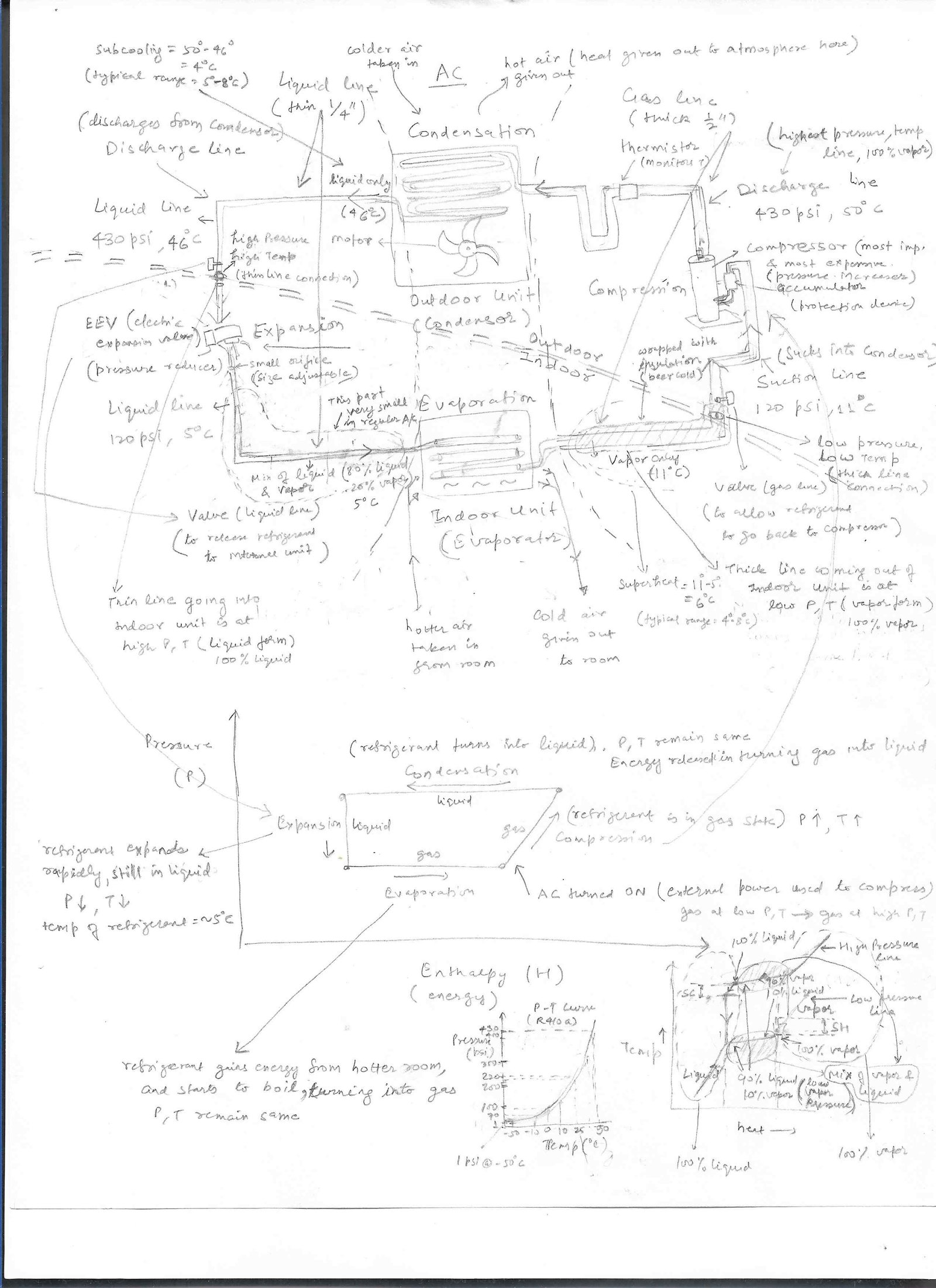
Basic info on how AC works is in "Thermodynamics" sub section under "Physics"
Deals and Brands
Multiple brands available and few of them are advertised as DIY. Hwever all minisplits are DIY as it requires very basic knowledge and watching a few youtube videos.
MrCool:
There are many brands of mini split systems that are advertised as DIY. The most popular among them is Mr Cool Mini split AC systems". They are sold by Amazon, costco, and several other stores. They are expensive with prices staring from $1500. Here's a link to amazon: https://www.amazon.com/s?k=mrcool+mini+split
- 12K BTU unit (1 TON, running on std 115V supply, 4th gen) 22 SEER System => https://www.amazon.com/MrCool-Ductless-Split-System-Generation/dp/B0B39H7CNK => $1800 (used to sell for $1000 on sale in 2020)
- 24K BTU (2 Ton) 20 SEER systems => $2200
- 36K BTU (3 Ton) 16 SEER systems => $2700
Recent deals for Mr Cool:
- 2023: 12K unit for $1200 => https://slickdeals.net/f/16592114-costco-members-mrcool-e-star-diy-4th-gen-12k-18k-btu-ductless-mini-split-heat-pump-1199-99
- 2020: 12K unit for $1100 => https://slickdeals.net/f/15185710-mrcool-diy-12k-btu-115v-mini-split-air-conditioner-and-heat-pump-with-wi-fi-smart-controller-1099-99-at-costco
Pioneer:
Mr Cool advertises itself as completely DIY. However, there are many other brands much cheaper than Mr Cool, that are also DIY, and don't involve any more work than Mr Cool ones. One such brand is Pioneer, usually on sale at home depot multiple times a year. Look in the deals section for when it's on sale. Here's a link to homedepot: https://www.homedepot.com/b/Heating-Venting-Cooling-Mini-Split-Air-Conditioners-Mini-Split-Heat-Pumps
- 12K BTU (1 Ton) 20 SEER systems => $800
- 24K BTU (2 Ton) 18 SEER systems => $1200
- 36K BTU (3 Ton) 17 SEER systems => $2200
As you can see, Pioneer ones are lot cheaper than Mr Cool, and they are just as easy DIY as Mr Cool ones. There are little lower in efficiency (you can get higher efficiency ones for a higher price). These are non-sale prices. When on sale, you can easily get 25%-35% off these prices. So, these would cost almost half of what similar Mr Cool ones would cost. I've myself installed Pioneer system, and it's very simple. You need to buy an extra item called Kwik Evac, and that will make the whole job DIY. If I can do it, anyone can do it.
Misc:
Many chinese branded minisplit are on sale for 1/2 the price of what above companies charge. Reviews seem positive for some of them. Longevity is a question though. Instructions are poor, but you can always find a youtube video for installation of that particular unit. 1 Ton minisplit go for $400 while 2 Ton go for $600 when on sale. Yitahome brand has positive reviews on slickdeals, and is more widely used.
Few deals:
- 07/14/2025 (still available as of 10/01/2025): Costway 1 Ton minisplit AC for $579. It's 115V supply, so it can be connected to regular outlet. Not the best price, but decent reviews.
- 13/06/2025: Yitahome minisplit => 12K BTU (1 Ton) for $400 and 24K BTU (2 Ton) for $660. Link => https://slickdeals.net/f/18376702-yitahome-ductless-mini-split-air-conditioners-24-000-btu-2-ton-18-5-seer2-240v-660-more-free-shipping?src=frontpage
- Installation video: https://youtu.be/IPlJrxOocC0?
Pioneer mini split installation:
I bought 12K BTU Pioneer mini split system linked below for $600:
It has a part that can make DIY even easier. Buy this part at link below for $35:
Videos:
Pioneer has a channel on youtube showing various manufacturing steps as well as troubleshooting Error codes => https://www.youtube.com/@PioneerMiniSplit
Brand new AC unit being filled in with factory installed Refrigerant after vacuuming down the pump lines. Link = https://www.youtube.com/watch?v=5trJX6Ef1iI
Service valves on minpsplit (how it works) => https://www.youtube.com/watch?v=Ujmd9BKjhbM
One more good video here for installing the mini split yourself: It's long but very thorough => https://www.youtube.com/watch?
Video on how to use the Kiwi E-vac part is here => https://www.youtube.com/watch?v=ZDXIIJwDkM8
Watch both these videos, and that will give a very good idea of how to install it. We'll follow both videos above in our installation process.
Installation:
I've installed this particular unit myself. I'll detail the steps, and highlight where it differs from above videos.
Power requirements of this unit:
This unit runs on regular 110V/120V supply, so theoretically you could hook up to your regular power outlet. That's a big deal, as you don't need 3 phase 220V supply for this unit. Thus unit draws a current of 10A (as listed on HD website) and draws power of 1080W (110V*10A=1100W). So, power draw for this unit is small compared to other appliances in the house. As a comparison, my drill driver draws 8A of current, while my bread toaster consumes 1200W, and my microwave consumes 1600W (and these are all connected to regular outlet without tripping anything). So, this unit can easily be connected to a regular power outlet. The trip point for the circuit breaker in the panel of your house is usually 15A - 20A for different outlets. So, if you choose a outlet on which you don't plan to load anything else (or not more than 1 A of current), then you can use that outlet to connect the external unit (provided the circuit breaker for that outlet is rated for 15A or more). The internal unit's power lines go back to external unit, and the external unit is the one that powers everything. So, we have just 1 power connection, and that is from the external unit.
Video above says to install a disconnect box. Disconnect box is nothing more than a switch, which disconnects the AC unit from home supply (for repair purposes). We already have switches in the main circuit breaker panel of the house, so regular outlet has a switch anyway, if we ever need to switch off the mini split. Or we can just out the plug from the outlet, and the unit will be disconnected. So, from electrical side, there's nothing to be done. Just find a outlet
Parts:
- The 12K mini split unit purchased from home depot in link above
- Kwik E-vac purchased from home depot in link above
- Alternative to Kwik E-Vac => You will have to buy a vacuum pump and an adaptar to connect vacuum pump to the service port.
- Vacuum pump => Very good tutorial on how Vacuum pump work: https://www.youtube.com/watch?v=pnqXEnn3DNk. This video shows basics of using vacuum pump: https://www.youtube.com/watch?v=cF-4bW8y5Zs
- Vacuum pump and manifold kit (a Refrigerant leakage detector is also included): https://www.homedepot.com/p/XtremepowerUS-1-3-HP-4-CFM-Air-Vacuum-Pump-HVAC-A-C-Refrigerant-Kit-with-AC-Manifold-Gauge-Set-and-Leak-Detector-71098-H1/319484969
- R410a based adaptar => The service port of any R410a based mini split is 5/16 inch male port, while most of the female attachments available with any tool are R22 based which are 1/4 inch in diameter. So, you won't be able to attach or vacuum pump or anything else unless you get the specific adaptar. The adaptar needs to have the female side as 5/16 inch, while the male side needs to be 1/4 inch so that it can connect to vacuum pump (basically you are converting 5/16 port to 1/4 port so that all your gadgets can connect to it). It's possible that you may have the correct adaptar sold as an accessory with the vacuum pump, but the pin in these don't get pressed all the way to the value in your service port, so the service port will never allow gas to go in or get out. You will also want to have some sort of tap or control knob in the adaptar to control the flow of refrigerant, or else you risk loosing refrigerant or getting frostbite on your hands. Below are some available:
- Lots of adaptar with control knobs available on amazon. One such that worked for my Pioneer Minisplit is here: https://www.amazon.com/dp/B07T2QQH81. However, the problem is that a lot of them leak, and you won't even know it, unless you are using a micron gauge. So, you will be losing refrigerant while filling or topping off, or worse getting air in your system. There is basic flaw in the design where there are 2 parts in this adaptar, and both move independently, so that point of movement becomes a leak source. I'll post a link if I find a good one.
- Pioneer has an adaptar that will work, but it doesn't have a control knob. This is our safer bet, as it won't leak since it comes from Pioneer Co itself. Home Depot Link => https://www.homedepot.com/p/Pioneer-Mini-Split-System-Converter-Adapter-for-Charging-Vacuuming-Port-from-5-16-in-SAE-to-1-4-in-SAE-POAD-5-16F1-4M/314106770
- Vacuum pump => Very good tutorial on how Vacuum pump work: https://www.youtube.com/watch?v=pnqXEnn3DNk. This video shows basics of using vacuum pump: https://www.youtube.com/watch?v=cF-4bW8y5Zs
- Alternative to Kwik E-Vac => You will have to buy a vacuum pump and an adaptar to connect vacuum pump to the service port.
- Cordless Drill driver. I'm just providing an example link. You can find tons of them for under $50. If you combo with impact driver, you can get both of them for around $60-$70. Power of drill is very important, as we have to cut thru outer wall, which requires high power (high torque and speed). If cordless drill isn't able to do it, get a corded one, as those have much more power. Power (W) = torque (N-m) * angular velocity (in radians) = T*2π*rps = T*2π*rpm/60 = 0.1*T*rpm. We will use this formula to convert power to torque and vice versa. Power for drills is usually given in in-lb force/sec. 1in-lb fps = 0.025m*0.45kg*9.8m/s^2=0.11W. Usually drill drivers have a chuck size (Diameter of hole where you attach your bit) of 3/8 inch or 10mm. This is a standard size to fit all sizes of bits. Don't buy a impact drill or impact hammer (buy just a regular drill). Below are links for both corded and cordless drills.
- Cordless drill: Link: https://www.lowes.com/pd/BLACK-DECKER-Matrix-20-Volt-Max-3-8-in-Cordless-Drill-Charger-Included/50248991 => price $50. This has output power of 122 in-lb fps. This equates to 15W of power. It has max rpm of 800.
- Corded drill: Link: https://www.homedepot.com/p/DEWALT-8-Amp-Corded-3-8-in-Pistol-Grip-Drill-DWD110K/308540958 => price = $80. This has power of 110V*8A=900W. With max rpm of 2500, we get torque=4 N-m @2500 rpm. You can see that power of this corded drill is like 50 times that of the cordless drill above (900W vs 15W). So, much better to use corded drills for this kind of jobs.
- A stud finder (so that when you make the 2.5 inch hole, you don't hit stud). Link: https://www.homedepot.com/p/Zircon-StudSensor-HD55-Stud-Finder-65945/205143494
- A hole saw for making big 2.5 inch hole. You need 2.5 inch hole saw. Three kinds of hole saw = metal, carbide and diamond hole saw. Metal hole are cheaper and can cut thru drywall, but will struggle to cut the outside wall (i.e stucco and bricks/cement) of the house. Carbide are in the middle while Diamond are most expensive but wil cut thru anything. So, better to buy the Carbide or Diamond hole saw. In my case, carbide hole saw worked fine to cut thru stucco. Links:
- Metal hole saw: These will not work on outside walls. These do come with different size saw, as well as a thread arbor and pilot bit.
- Home Depot: https://www.homedepot.com/p/Milwaukee-Hole-Dozer-Bi-Metal-Hole-Saw-Kit-7-Piece-49-22-4038/318151465 => on sale for $30
- Carbide hole saw: These say that they work on cement, and I found that they indeed work well on outside walls. Cheaper than Diamond ones. These don't come with Thread arbor (it says non arbored in description) which you connect to the center of the saw to attach it to the drill. Buy the above metal saw and use the Thread arbor from there into this. You can always return the above metal saw if unused.
- Lowes => https://www.lowes.com/pd/Spyder-2-1-2-in-Carbide-Tipped-Non-Arbored-Hole-Saw/1001148202 => price is around $20
- Diamond hole saw: These will work on outside walls. These too don't come with Thread arbor. Both below go for about $40.
- Metal hole saw: These will not work on outside walls. These do come with different size saw, as well as a thread arbor and pilot bit.
- A concrete base to put the outside unit on. Some people buy expensive and fancy wood base, brackets etc. You may something similar to these (or combination of these). You also need 4 concrete screws to screw into these concrete blocks. Just ask for them at HD or lowes. Don't forget to use the shock absorbing pads (provided with the mini split) to put in between the screw and the concrete block. Also remember to level the unit and the concrete blocks themselves. Else the unit may be tilted, which isn't good for long term operation of unit.
- 8X8X16 concrete block => https://www.lowes.com/pd/Common-8-in-x-8-in-x-16-in-Actual-7-625-in-x-7-625-in-x-15-625-in-Standard-Cored-Concrete-Block/3608978 => $2 => This is the one that worked nicely for my unit.
- 4X8X16 concrete block => https://www.lowes.com/pd/Cap-Concrete-Block-Common-4-in-x-8-in-x-16-in-Actual-3-625-in-x-7-625-in-x-15-625-in/3608974 => $1.50
- 8X2X16 concrete block => https://www.lowes.com/pd/Headwaters-Construction-Materials-1-5-8-in-x-8-in-x-16-in-Patio-Heavyweight-Concrete-Block/1002657274 => $2
- Concrete anchors or screws => https://www.lowes.com/pd/Simpson-Strong-Tie-2-1-2-in-x-3-8-in-Concrete-Anchors/1002707726 => This is a $0.50 a piece, but you can get packs of 8 for $3 or so.
- Concrete anchors or screw pack => https://www.lowes.com/pd/Simpson-Strong-Tie-3-16-in-x-1-1-4-in-Zinc-Plated-Self-Tapping-Concrete-Screw-8-Count/1002710342
- => pack of 8 for $3
- A torque wrench. A non-torque wrench (i.e regular wrench) is also ok, just be sure not to overtighten. If you overtighten and the connection at flare nut develops cracks, you would have to make a new flare, which is a big can of worms. If you watched video, you would notice that the guy didn't use a torque wrench, just used his arms and regular wrench to tighten it a little bit more than normal. If it stops turning, you have tightened it enough. Use wrist strength for thinner line and arm strength for thicker line as per the manual. UPDATE: My unit started leaking after 6 months, and stopped cooling. It may be due to connections not being tight enough. Get a torque wrench if you want less hassle. Thinner line needs a lower torque of 15-20 N-m, while thicker line needs higher torque of 31-35 N-m.
- Regular wrench (no torque settings): https://www.homedepot.com/p/Husky-12-in-Adjustable-Wrench-90130/313528145 => get this 12 inch wrench as it can be used for other home jobs too. Get 2 of these, since you need to hold one side with a wrench, and use other one to tighten the nut. Cost is $15.
- Open End Adjustable torque wrench: There are lots of torque wrench that Home Depot, Walmart, ebay, etc sell that won't with mini split. Reason is that they are not open ended, so you can't get them around the flare nuts. One that will work is here: https://www.amazon.com/dp/B08RXR5FGG. This has torque rating from 5 ft-lbf to 100 ft-lbf which is roughly 7N-m to 135N-m. Use torque from 23 ft-lb to 26 ft-lb for our 3/8 inch line, and from 11 ft-lb to 15 ft-lb for our 1/4 inch line. .
- A sealant is already provided to make good seal at the flare nut. You may also buy Nylog sealer or the sealing gaskets to put on the flares. Use one or the other but not both.See below in "Refrigerant Leak" section for the link, in case you need one.
- A leak detector liquid. Use soap water, if you don't want to spend any more money. Put soap water in a glass tube that you get with spectacles (to clean your glasses). That tube has the spraying feature, so works very nicely. Links in case you chicken out:
- Lowes and Home Depot: https://www.lowes.com/pd/BrassCraft-Gas-Plastic-Water-Heater-Gas-Leak-Detector/1000097902 => little bottle for $7 but works as per reviews.
- Home Depot => https://www.homedepot.com/p/Hercules-Megabubble-32-oz-All-Purpose-and-Gas-Leak-Detector-45802/203304177 => bigger bottle for $15, not needed, since smaller one will suffice
- Amazon (highly rated leak detector) => https://www.amazon.com/product-reviews/B082MQZBV5
- Thick 16 AWG wire for connecting power supply of mini split to the power outlet. 16 AWG are rated for upto 15A, so good enough for our AC connection. Spec shows 7A current draw for cooling, and 9A for heating. However, it does show min circuit amp to be 20A. So, that would require a 14AWG wire. But 14AWG might be overkill, as currents shouldn't exceed 15A under normal circumstances. Also, need a 3 prong plug to connect to the wire, and inserting it the outlet. These are not provided with the unit. Buy the ones below which are 25 ft long. Don't buy ones sold by the foot, as those are very expensive, and non returnable.
- Power cord => https://www.lowes.com/pd/Southwire-25-Ft-16-3-SJEOOW-300V-Power-Cord/5001841321 => price is $10 for 25 ft. Cut it as per your need.
- Power plug => https://www.lowes.com/pd/Eaton-15A-125V-3-Heavy-Duty-Armored-Plug-YL/1002943694 => These cost $4. I couldn't find cheaper ones. Get ones with grounding included (i.e 3 pins and NOT 2)
- 6 foot Power cord + plug => https://www.amazon.com/gp/product/B07BQ8MRKR => This is an alternative to Power cord + plug above. It costs only $5. this is what I used, as my power outlet was close by.
- Dedicated power supply outlet is needed to be compliant with various city electric codes, but I was able to just use a regular power outlet. Those power outlets are usually rated for 20A and 30A max current. I had the power outlet rated for 20A (look for this number on circuit breaker panel in the garage). I used the existing 20A outlet, and will make sure not to connect anything else to this power outlet. Looks OK to do this, without getting into complicated new electrical connections.
Installation:
The mini split has 2 parts = The inside unit called the head (or evaporator) and the outside unit called the compressor or condensor. Installing inside unit is very easy. Most of the work is on outside unit. Follow the video on link above:
Steps:
- The very first thing even before you open the box is to determine where can you make a hole on the exterior wall. that connects to the area inside the house where you want to install the head unit. Once determined, use the cardboard provided to make the hole and then make 6 holes for the inside unit to hang. The 6 holes don't need to be on stud, as the head unit is very light (<8kg, about the same weight as a heavy picture). Actually you don't want any of these screws on a stud. If there's a stud in the way, then don't use the plastic anchor, just directly drill the screw into stud. On the drywall, you need the plastic anchors to hold the screws in place. Insert the provided hollow plastic pipe (wall sleeve) in the hole, thru which all pipes will pass.
- NOTE: the hole can be on left side of unit or the right side. This video shows hole on left side of unit. If you need hole on right side, straighten the pipes at 90, so they come straight out of the head unit. I installed it with hole on the left side.
- The hole on the outside needs to be just a tad lower (5 mm or so) than the inside hole. This is so that the drain pipe is inclined downward, and water can flow out.
- The inside hole on the wall can be made from inside the house, while the outside hole on the exterior wall, should be made from outside the home (not from inside the house). The reason is that stucco may crack into spider web kind of thing, if done from inside the house. When doing from outside wall, the circular saw prevents cracking of stucco.
- Once hole on the wall is done, pat yourself. It's a big part of the job. Now make all connections to inside unit. There should be 2 pipes (1 thick gas line and 1 thin liquid line), 1 drain line and one wire set (with 4 wires in it). Connect these to inside unit as shown on video. Take these 4 connections out thru the hole to connect to outside unit. Leave these unconnected for now. Make sure the 2 pipe connections using provided screws which are done on the inside unit are tight enough (to proper torque). Put provided sealant on the flare nut to make good seal.
- Leave the inside unit on a raised floor, since we will need to check for leaks later. If we hang it in place, then it will be difficult to check for leaks. Or you can put something behind the unit, so that the inside unit is raised allowing you to check for leak in connections of lineset.
- Use wrapping tape or teflon tape provided with the unit to seal the 2 connections, as well as wrap the 4 connections together, so that we keep all connections together.
- Use the foam pipe insulation provided to wrap the drain hose that's indoor, to prevent condensation.
- Now make connections to outside unit as shown in video. 2 pipe connections are the same as we made inside. Use correct torque and sealant. Now, connect the wire set coming from inside to the unit outside. Let the drain pipe hang. If it's too long, and won't hang from the wall, then cut it a little, as you don't want it lying on the soil. Now you stop the video at time = 42 minutes, where the technician cuts the linesets to make them the right length. We shouldn't need to cut the linesets as it's lot more work, and not needed. Just leave the linesets folded in a circle (the way it came) if there is any extra length. It doesn't hurt anything. Cutting the lineset is not something that an amateur should do, as it is a recipe for future leaks.
- In the video, we see that he makes both lineset connections and then uses a manifold gauge. We'll just skip this whole section, and follow our own procedure using Kwik E-vac. There's no need to watch the 1st video after time = 42 minutes. Follow the Kwik E-vac video from now on (2nd link above). It's a 3 minute video and very simple to follow. Kwik E-vac will clear the pipe of any dirt, moisture, etc by pushing it's own gas, Nitrogen thru the pipes and then vacuuming it. There is no need to do any additional pressure check. There is no need of any manifold.
- For the thick gas lineset, connect it to the outside port (port with service valve on it). Tighten it with wrench as far as it allows you to tighten. Leave the thin liquid lineset unconnected for now.
- Attach connector tube to can as shown in video (the tap on the can is closed, i.e it's at max height, meaning it doesn't allow gas from the can to pass to the connector tube). Now open the service valve, and attach the connector tube to it (with can in it). Open the tap of can (moving it clockwise), and let the gas in can flow to the thick lineset thru the service port. Gas will start coming out of the other open lineset. Empty the can 1/2 to 2/3. I would say give it good 3-5 minutes. Gas would keep coming out thru the thin lineset. When can starts feeling light, it means there is little gas left.
- At this point, close the tap of the can (i.e stop the gas from flowing by turning tap anticlcokwise), and connect the other thin lineset to the other port quickly. We do it quickly, since with the gas being stopped from flowing thru the connector tube, any leaks in connector tube itself will allow moisture and other gases to get into the lineset. So, we try to avoid that. At this point, the refrigerant lineset is sealed and is clear of any moisture/air, as it was filled with the gas from our can, which is harmless. We now tighten both the ports to specified torque.
- Now let the can empty completely by opening the tap. Can may not be able to empty completely as the gas may not have space to go inside the lineset. We jut leave it connected for 5 minutes or more, and hope most of it gets out. Now disconnect the connector tube from service port (Says in the comments of the video on home depot website). This ensures that any impurity from outside thru leak on connector tube doesn't make it's way into the lineset. Pressure in the lineset at this point is high due to the gas from the can inside it. It says on the website that it's at 600 Kpascal, so it's high enough pressure to check for leaks. With the connector tube disconnected, check for leaks on all 4 joints. Tighten any connections as needed. It's very important that there's no leak at this stage.
- After checking for leaks, connect the connector tube (with can attached and tap in close position) to service port again. There might still be some gas in the can, which might try to come out a little. Unscrew the can from the connector tube. This is now being done to get all the gas out from the lineset. Remember, we needed to push gas into the lineset to clear out impurities in lineset, and now we need to take out all of this gas, so that we create a vacuum there. We don't want to leave our gas from the can in there. There will be hissing sound with remaining gas coming out. Now disconnect the connector tube from service port. This completes the Kwik E-vac vacuuming process.
- NOTE: It won't be complete vacuum as we are getting the nitrogen gas out by opening the hole on service port. This means, as soon as pressure inside the lineset equals that of atmosphere, nirtogen gas from inside the lineset will stop coming out. But that is ok as per Pioneer instructions.
- Alternative Vacuuming process using manifold gauge: As I stated later, I had big leak that I found a year later, so I'm putting another link here for vacuuming process using manifold gauge. You don't need to do this, if you used the Kwik E-Vac process above and checked for all the leaks. This process using manifold gauge ensures complete vacuum though. If the vacuum doesn't hold up, that means there is a leak. See the "Leak detection" section below, how to find the leak and then pressure testing it, and then vacuuming it out again, and see if vacuum holds up.
- Link to vacuum out new unit using vacuum pump (from HVAC Mechanic in 2024): https://www.youtube.com/watch?v=DgaPPyAZSTs
- Almost Same Older video from HAVC Mechanic from 2022: https://www.youtube.com/watch?v=SajCPoYmRaQ
- Now with vacuuming done, we have to release refrigerant into the linesets. Until now the lineset and the indoor unit are all connected to each other, but the outdoor unit condensor (big unit) is disconnected with the lineset via the 2 nuts on the outdoor unit. Refrigerant is in the condensor unit, and linesets are in vacuum state. We need to make the opening from condensor side into the lineset so that refrigerant can flow thru. This is done by opening the 2 nuts as shown on 1st video and then using the hexagonal wrench provided to turn the screw inside it. The screw is totally in when you get the system for the first time. This means it's disconnected. We need t start getting the screw out, which gets it connected. By turning it anticlockwise (rotating the screw outwards), we open the hole inside to let refrigerant get into the linesets. Turn it anticlockwise until it doesn't turn anymore. First do it for the thin liquid line set as refrigerant flows out thru that line. Now repeat same operation for thicker gas line set by turning the wrench anticlockwise completely until it doesn't turn anymore. Refrigerant makes it way from condensor to thin lineset to thick lineset and back into the condensor unit. Now both linesets have the refrigerant. Close the outer nuts that you opened. At this point, inspect for leaks once more on all 4 connections. If you didn't have any leaks before, chances are high that there will be no leaks now. If there is a leak now, you are out of luck. You have to go thru extensive process of putting the refrigerant back into the condensor unit, closing the 2 nuts, and then fixing the leaks. One such video put by Pioneer team is here: https://www.youtube.com/watch?v=Tz2RfUke4DQ
- Assuming that there are no leaks, we now make electrical connections from power outlet to outside unit. We use our 16 AWG wire for this. Now turn on the unit, and follow instructions for remote control. Make sure unit is able to cool the room to a very low temp.
- Now cleanup any loose ends. Close the hole in the wall with the packing sealant provided. Use the wall sleeve to seal that hole and look nice. Also, wrap all 4 connections coming thru the hole with the provided wrapping tape to make it look nice. Outside yard or where ever your outside unit is placed, make sure it's on concrete block, and is screwed to the concrete by using shock absorbers (provided with unit) and drilling nail thru it. All the placement is final at this point.
- Congrats you are done. That was simple :)
The whole project will cost about $600, and could be done in half a day. Better to go slow and do it right. Getting hole in the wall is the biggest thing that turns people off. Once you do it, you know how to do it. Then it's not a big deal. Good luck !!
Replacing blower motor:
This vid shows the process of disassembling inddor unit of a pioneer minisplit to replaces the cyclindrical blower motor. It's also one of the best ones to know how to disassemble the unit => https://www.youtube.com/watch?v=6IE7u6bfJZE
Refrigerant Leak:
Looks like I celebrated too soon :) After working perfectly for 6 months, the minisplit unit just stopped cooling one day. My suspicion was that the Freon leaked out, as inside unit showed no error code. The inside unit would start just fine, but wouldn't cool. On looking at the outside unit, I saw frosty fluffy snow kind thing on the thin line (liquid line) where the lineset was connected to the outside unit. Looking around on youtube, looks like that's possibly a freon leak. There are 4 connections we made using flare nuts, so my first suspicion was one or all of these connections may be leaking. The soap bubble test that I did while installing, didn't show any leak. But I did read that soap bubble test is not reliable for detecting very small leaks.
Ice forming on any of the two lines is due to 2 completely different reasons. Ice forming on the thin discharge line (liquid line) is due to low refrigerant, while ice forming on the thick suction line (gas line) is due to dirty inside unit which is somehow blocking the refrigerant from flowing. Thick line ice forming is relatively easier to resolve by cleaning the inside unit, while thin line ice formation due to refrigerant leak requires more extensive fix. Not a good situation to be in. Here's a link to why ice forms on 2 lines (in Hindi): https://www.youtube.com/watch?v=5JMDd3F63Ys
So, You need to get few things from various stores before you can get started:
- Vacuuming the lines and unit: First you need to get a Vacuum pump.
- Sealing the flare connections: This is THE most important thing in the whole installation. If you don't do a good job, a leak will be present here, and your AC will stop working after some time. Here's another video that says that 99.9% of minisplit DIY stop cooling after a year due to refrigerant leak. He suggests using this gasket for making a air tight seal: https://www.youtube.com/watch?v=gND6-4gjs-4
- However, this gasket is untried, so I would go with Nylog (link below) which is more commonly used in all AC to seal the flare. Here's the video: https://www.youtube.com/watch?v=hQjOhWkGmM4
- Link to Nylog blue sealant (~$15): https://www.amazon.com/Refrigeration-Technologies-RT201B-Gasket-Sealant/dp/B008HOSQQQ
- Filling the refrigerant: Refrigerant (R410a) is what is used in Pioneer units. Most of the sites now require EPA certificate to purchase. Link to one that sells for a decent price (without going thru EPA certification):
- Ability Refrigerants (25 lbs for $400) => https://abilityrefrigerants.com/product/r410a-refrigerant-25-lbs
Steps For topping off Freon:
You can do a full vacuum, find the leak with nitrogen test and then fill in new refrigerant. It's too much of work, and may not be needed if the leak is small enough. So, what I did was to just top it off by adding more refrigerant. This is very simple, and will work even if your refrigerant is almost all gone (assuming it took a year or more to leak out completely, indicating a small leak) . This doesn't involve using vacuum pump.
Here's a video showing the top off steps. I followed this video for the steps I listed below: https://www.youtube.com/watch?v=LrMQONBJJgE
These are the steps:
- Turn off the AC unit. Get your vacuum gauge and connect blue hose (low pressure) to service port on outside condensor unit. Check the pressure. Most likely your vacuum gauge can't connect to service port. You might have to connect the adaptar to the service port. See which one to buy in bullet 2 of "parts" under Installtion section above.
- Check connections: Keep the knob (the circular thing on the side of the vacuum gauge) to fully closed, so that it closes the center hole. If the center hole remains open, the refrigerant from your AC will make it's way out thru the yellow hose in the center. You don't want that. We are just checking the pressure, w/o losing any refrigerant. So, we'll do that and measure the pressure. This is the low side pressure, and needs to be in between 120psi - 125psi. However, with the unit off, you will see the pressure to be around 220PSI which is normal. It doesn't mean that the pressure is ok, or there is no leak.
- Now turn on the AC unit, and keep checking the pressure. You will see the pressure drop in a few seconds from 220PSI to < 120PSI. If it's lower than 50psi, that means, there is a large leak, thru which the refrigerant is escaping. You will also snowy flakes on the thinner line (liquid line). This indicates low refrigerant, as i explained above. Other signs of low refrigerant are ice building on the inside unit, or oil seen near the thin/thick lineset or anywhere around the outside unit. All these indicate refrigerant leak.
- Purge air: Purge air out of pipes in vacuum gauge. This is needed, otherwise when we push refrigerant from tank to our AC unit, some of the air in the pipe of gauge will make into our system. After going thru so much work in getting the system purged, we definitely don't want to allow that air to get in. Good video here on how to purge air: https://www.youtube.com/watch?v=RndlC9g5HzQ. Now connect the yellow gauge (from which you purged out the air) immediately to the refrigerant tank while the air is still purged out. This way there is only refrigerant in the yellow hose and no air is able to get into the yellow hose. Some air will always get in no matter what, but the goal is to keep it to a minimum.
- Refill Refrigerant: Turn the refrigerant tank upside down, and open it up to let refrigerant in the lineset. Keep the knob on manifold gauge closed and only open it a little at a time to let some refrigerant in. That way you only allow 1oz at a time. My minisplit had a capacity of 35oz, and it's pressure was 40PSI, so I know it needed more than 25oz of refrigerant.
- Check Pressure: Keep measuring the pressure, while the AC is still ON. Once pressure reaches 110PSI, be very careful with how much you let in. Pressure fluctuates with AC running, and the temperature inside. If you get intent on getting the prressure to 120PSI, you may end up putting in more than the max capacity of your AC unit.
- Final Check: Once pressure stabiliizes around 110PSI - 120PSI, turn off the AC unit. Restart it again, and check if it again gets to that pressure range. There should be no snow buildup anymore on the thin lineset. Once satisfied, disconnect the pressure gauge. Make sure to get the refrigerant out of the manifold gauge. Keep checking the pressure of the AC unit every few days to make sure the pressure is not going down. That might indicate a leak.
Steps For Vacuuming, fixing leak and refill:
If the above process results in minisplit leaking out again, then we have no choice but to go thru the painsticking process of finding the leak. It's a DIY too, but just requires more time ad patience.
In case you need to make new flares, Ben's video on other mini split unit involving making new flares: https://www.youtube.com/watch?v=1gCCau34KeA
Video showing full vacuum of the AC (including the condensor outside, and not just the tubes), and then adding full refrigerant by weight. This is the most complete video that I needed for my leak, since my refrigerant completely leaked out after few months of refill (freon topoff method shown above), as the outside unit stopped running after a while. This is the ideal procedure to do when you have a major leak, since air/moisture has gotten everywhere, even inside the condensor, so getting rid of all the old refrigerant, vacuuming it, and then putting fresh refrigerant as if it was a new unit: https://www.youtube.com/watch?v=7aVvJmpJfmA
Full procedure for vacuuming your system is here (HVAC School) => https://www.youtube.com/watch?v=JsnQeUSuUMU
One more animated video from HVAC school => https://www.youtube.com/watch?v=JaSUDn2VU04
In short these are the steps for full Vacuum:
- Turn off the AC unit. Disconnect power supply to the AC. Connect the manifold analog gauge as done previously. The middle pipe of the manifold gauge needs to be connected to the vacuum pump, instead of to the refrigerant tank. WE start the vacuum pump, and the vapor + any remaining refrigerant comes out. Look at the pressure reading on manifold gauge. Within a few minutes it will start coming down to 0 and then go -ve to -30 psig (or -1 bar), implying close to vacuum. The manifold gauge will show this vacuum level pretty quick, but it's still like 25,000 micron pressure. We need to take it to < 500 microns to be classified as "vacuum". That will take about 30 mins. So, leave the vacuum pump running for 30 minutes.
- Check for leak: Now, close the knob of blue hose on manifold gauge. Now turn off the Vacuum pump. You should now leave the setup for a day and check if vacuum pressure stays at -30psig or if it rises. If it stays there, that means there is no leak, or the leak is small enough where it doesn't matter. But more than likely the pressure will rise to 0 indicating leak. Some leaks will actually not show up with vacuum test, but will instead show up with high pressure. So, we have to move to the high pressure nitrogen test.
- Nitrogen test: You have to buy an empty nitrogen tank, a pressure regulator and fill the tank with nitrogen at a filling station. Now connect the nitrogen tank to the service port (remove the manifold gauge as we don't need it for this test). The regulator checks the pressure of nitrogen. Go for 200 PSI pressure. Here are the links for buying items:
- Empty Nitrogen tank: You need to get a size that is most commonly available. In my area, 40 cu ft volume is the most common one available at local local filling station. So, I went with that one, and looks like that's also the one that's most commonly available on ebay and amazon. Choose the tank with CGA580 Valve, as ones with other valves are for other gases as Oxygen, etc. The one with CG580 will work for nitrogen filling. It will cost $100 for 20 cubc feet, $140 for 40 cubic ft and $160 for 60 cu ft volume.
- Amazon (40 cfm for $140): https://www.amazon.com/gp/product/B01E2T8IUS
- Ebay (60 cfm for $160) : https://www.ebay.com/itm/234250283635
- Pressure regulator: You need this to connect to nitrogen tank, so that you can regulate the pressure that you want in your AC lineset. You need the regulator with CGA580 inlet, matching the outlet on your nitrogen tank. You need one with high PSI (> 500 PSI), Should come with a decent length hose too.
- Amazon (for $40 with 600 PSI) => https://www.amazon.com/gp/product/B09C5X36VD
- Nitrogen Filling: Now you need to get nitrogen filled in the tank. Airgas is the most common supplier of these gases. Goto airgas.com and search for locations in your area. Most places don't fill the tank, instead they talk your tank, and give you a filled tank of same size. These filling stations charge 2X-4X the price for getting gas wit tank included. Also, the regulator is priced for $250 or so at these places. Since we already bought, we have to only pay for nitrogen gas, which is cheap. Airgas stores around me charged $37 for filling 20 cfm tank, $61 for filling 40 cfm tank, and $86 for filling 80 cfm tank, So, nitrogen gas is basically $1per cfm. Most economical is to go with larger tank, but then it's harder to find a place which will have these larger sized tanks to replace. So, you are better off going with 40 cfm tank which should last a long time.
- Airgas Filling stations => https://locations.airgas.com
- Connecting regulator to nitrogen tank. This video shows how to do it => https://www.youtube.com/watch?v=z0dvyhXmVfc
- Empty Nitrogen tank: You need to get a size that is most commonly available. In my area, 40 cu ft volume is the most common one available at local local filling station. So, I went with that one, and looks like that's also the one that's most commonly available on ebay and amazon. Choose the tank with CGA580 Valve, as ones with other valves are for other gases as Oxygen, etc. The one with CG580 will work for nitrogen filling. It will cost $100 for 20 cubc feet, $140 for 40 cubic ft and $160 for 60 cu ft volume.
- Leak check: Once you have pushed in nitrogen at 200PSI in your AC linesets, It's time to do bubble test to check for leak. My soap test didn't reveal any leak earlier, so I bought "Big Blue" solution from amazon (link provided above). NOTE: there's no leak detector that will work, as it's nitrogen gas. The only test for leak you can do are "soap bubble" test or "ultrasonic leak detector". Since ultrasonic leak detectors are very expensive and may or may not work, the only test to do is soap bubble test. Look at the 4 connections that you made which are the most likely to be the leaking points. Spray a lot of soap water or "Big Blue" solution. Experts say soap water is just as effective. Also, if the leak is big enough, you can hear it at high pressure (No ultrasonic leak detector needed to hear it). I pressurized my system to 250 PSI. I didn't hear anything at the 4 connections, nor did bubble test reveal any leak. To rule out that the leak might be in the compressor/condensor unit, I cut off the supply to the external big unit by turning the 2 screws that we used in the very beginning to let refrigerant flow from the condensor unit to our lineset. We are doing the reverse here. The 2 screws will need to be turned to push them in all the way. After isolating that, I still had leak.
- Leak Found: Since all possible culprits of leak had been investigated, the only place remaining was lineset. I started listening to sound on lineset, and heard a faint sound in a small horizontal section of lineset. I was lucky that sound wasn't in the part that was going thru the wall, as I wouldn't have heard it in that section. I ripped off the insulation on the thin line, and there it was. A lot of oil around the insulation with bubbles forming in the oil, which was making that sound. It was a horizontal section of line feed. Reading on internet, it seems like that those insulating foam material can react with water (if somehow water gets in), and then they start corroding the pipe (mostly at places where pipe is in horizontal section). This is exactly what happened. Repairing leak in a lineset is the most dreaded job. We'll explore it in next section.
- Link on corrosion of copper lineset => https://www.hvacrschool.com/ductless-line-sets-and-corrosion/
- HVAC video on lineset corrosion => https://www.youtube.com/watch?v=4WCnz34SiX8
- Leak Found: Since all possible culprits of leak had been investigated, the only place remaining was lineset. I started listening to sound on lineset, and heard a faint sound in a small horizontal section of lineset. I was lucky that sound wasn't in the part that was going thru the wall, as I wouldn't have heard it in that section. I ripped off the insulation on the thin line, and there it was. A lot of oil around the insulation with bubbles forming in the oil, which was making that sound. It was a horizontal section of line feed. Reading on internet, it seems like that those insulating foam material can react with water (if somehow water gets in), and then they start corroding the pipe (mostly at places where pipe is in horizontal section). This is exactly what happened. Repairing leak in a lineset is the most dreaded job. We'll explore it in next section.
- ReFill: Once the leak is found, fix it. Then push nitrogen and check if the pressure holds. If it holds, then again do a vacuum test. If the vacuum holds (to 500 microns or lower), then we are good. If not using a micron gauge, but only a manifold gauge, then set vacuum to -30 in of Hg, and see if it holds to that level for > 30 minutes. Connect the middle connecting line of manifold gauge to the refrigerant tank, and start filling the line set (after purging the manifold lines so that you don't push any air inside the AC unit). Hope AC runs cooler now for a longer time !!
Steps For fixing leak in a lineset:
Having a leak in the lineset or the pipes in the condensor unit (the big unit installed outside the home) is a real nightmare to find. Once you have found it, atleast the worst part is over. Fixing it is not easy easy as flare connections, as you have to get into welding business and buy lots of supplies and get a lot of practice on spare pipes, before you can get it right. After you have practiced and gotten confident, only then should you try on the AC pipe with the leak.
If you don't want to get into fixing the leak, you can just buy a new lineset. It costs < $100 and will last a long time.Link below from HD, which sells it for $75.
If you don't want to spend money on lineset yet, you can go thru the process of fixing leak as outlined below.
The miniset lines as well as the pipes inside the condensor unit are usually Copper pipes in most systems. Some commercial systems use aluminum pipes, but aluminum is not preferred. It's not as strong as Copper. Most of the videos on getting quick fix for a small leak show it for Copper lines.
Soldering/Brazing/Welding:
For alloys, see in "atomic Bond" section in Chemistry.
When we have a hole in a metal or we want to connect 2 metal pieces together, we have 3 options:
Welding: Here base metal is melted and the two pieces of same metal connect to each other upon melting and then solidifying. This requires very high temp, as base metal usually have high melting point.
When we have 2 dissimilar metals to connect or even for the same metal piece to connect, we sometimes can't afford to melt the base metal. It requires very high heat and/or it may deform the base metal. In such cases, we use an alloy of base metal with a much lower melting point. We heat the base metal and then apply the alloy material at point where we want to join. These are called filler metals. The filler metal uses the heat from the base metal and melts since it has much lower melting point. This joint is equally strong. Higher the temp needed to melt the filler metal alloy, stronger the bond. Luckily for metals as Copper (Cu) or Aluminum (Al), it's very easy to find filler metal alloy, which will make a very strong connection to the base Cu/Al metal. There are many different alloys that bond to Cu/Al. These melt at different temp from 200C to 1000C. When we use alloy metals that melt at below 450C, we call it soldering, while above it, we call it brazing.
Flux: Both processes below require application of flux material which removes oxides from surface and makes them clean so that the filler material can bond more effectively. Some filler metal alloys come with self fluxing material, so that separate flux is not required. These usually contain Phosphorus. You should go for filler metals with self fluxing capability.
Soldering: Soldering is typically used in electronics to attach a chip to the PCB board. Pins/Bumps of chip are usually made of copper with coating of lead, tin, Titanium, Tungsten, etc. Lead free movement has resulted in elimination of lead from almost all devices. The soldering alloy is usually lead/tin (50/50 % also known as 50/50 solder) which melts at 183C. Tin by itself melts at 240C, while lead has higher melting point of 330C. So, eutectic effect is very prominent here. We also have 95-5 solder which is used in plumbing applications where lead is prohibited (not used in electric connections as wetting is not good). For electrical connection where we need lead free solder, we have Tin silver solder (Tin 95%, Silver 3%, and 1% copper).
Brazing: Brazing is usually used in HVAC pipes, water pipes, where high strength is required, as these pipes are under high pressure. Copper brazing is most common where base metal is copper. Copper melting point is around 1100C, so these filler alloy metals need to have their melting much below 1100C so as to not melt copper. Most brazing alloys have Cu, silver and Phosphorus in them with >80% copper. These alloys have their names starting with BCu indicating these are for brazing copper. BCuP indicates presence of Phosphorus too. Usually Cu > 80% in these, P is ~5%-8% to allow the alloy material to be self fluxing.
BCuP2 => Copper=93%, P=7% (No Silver). Mt pt=800C.
BCuP3 => Copper=90%, P=5%, Silver=5%. Silver lowers the melting pt even lower to 700C, flows better.
BCuP5 => Copper=80%, P=5%, Silver=15%. This is even better flowing, though it's more expensive than BCuP3, and has almost same benefits as BCuP3. So, I would stick with BCuP3.
The brazing alloys with silver are also marketed as SIL FOS alloys, where SIL FOS-5 (5% silver) is same as BCuP3 and SIL FOS-15 (15% silver) is same as BCuP5. SIL FOS is the name you will hear in a lot of training videos.
Here's a datasheet for sil-fos 15 => https://www.silfos.com/Lucas/Technical-Documents1/Sil-Fos15TDSEnglish.pdf
As stated in data sheet, SIL-FOS 15 will start flowing freely at 700C, so that's the temperature we target for melting all silver based alloys.
There's no difference between brazing and soldering except for the melting point, so we'll refer to them as the same thing.
Aluminum pipes:
There are many videos on fixing holes for Aluminum line. We aren't going to fix it for Aluminum pipes, but it's good to know the technique. One such video is below:
Fix leak on Aluminum line via soldering (quick fix) => https://www.youtube.com/watch?v=BkHMaPY1b-E
One more tutorial on Aluminum soldering => https://www.youtube.com/watch?v=8MyKBhfbjKw
Aluminum all in one Rod => This has flux included so that you don't need separate flux. If you don't get this with flux included, then you need to buy flux separately. Just get the rod with flux included (search on amazon).
Copper pipes:
The holes in Copper Tubes of AC can be simply be plugged by adding a soldering or brazing material on top of the hole. Here, we don't go thru the extensive work of cutting the pipe, and then adding new pipe (i.e treat it as a coupler), and then brazing/soldering at 2 ends. Folks on reeddit say it's as strong as the original tubing and for small holes works perfect.
Brazing videos:
Plug a large hole in copper pipe with Sil-Fos 15 braze rod => https://www.youtube.com/watch?v=TfT0RSpdFTg
Another hole filing in a plumbing pipe => https://www.youtube.com/watch?v=UKyu3Lx9CC4
Evaporator leak fix (much more complex) => https://www.youtube.com/watch?v=5Oy8gFIkq3Q
Soldering videos:
Video showing comparison between stay Brite soldering vs brazing => https://www.youtube.com/watch?v=hrXX4IjjChM
Video showing multiple stay brite 8 solder fixes => https://www.youtube.com/watch?v=TYj4uJjaP8g
Strength of Sta brite 8 joint => https://www.youtube.com/watch?v=gTScpkwK074
Soldering a vertical pipe => https://www.youtube.com/watch?v=NQmWLr1qBsM
My leak fix:
The leak in my copper lineset were along a 1 ft long horizontal section of pipe. I tried fixing it with 5% silver brazing rod and with Mappro TS800 torch. It still kept on having leak. So, I cut the pipe and used "BCuP3" brazing alloy to connect the 2 ends. The coupler sell on amazon. I bought pack of 10 for 1/4 inch lineset => https://www.amazon.com/dp/B0DFB14ST2
Steps:
- Braze the ends and do bubble test with 200 PSI of nitrogen.
- Once nitrogen test passes with pressure holding for couple of hours, connect a vacuum pump and create a vacuum down to 500 micros. IT will take 20-30 min to get to that vacuum level. Check after 30 min, Pressure shouldn't rise to > 1000 micron. If using manifold gauge, then vacuum it to -30 in of Hg and see if it holds there for 30 min.
- Once all clear, now disconnect the vacuum pump and connect the R410a tank to middle yellow gauge. The blue low side is still in vacuum, but the middle yellow section is no more vacuum. So you need to push in r410a thru the middle yellow gauge and then open the red high side to let some refrigerant come out. This will ensure that most of the air in middle section has been purged out.
- Now fill in 30-32 oz of refrigerant and start the AC. Check the pressure with manifold gauge, and ensure it's at 120PSI or so. Also, make sure it matches closely the refrigerant amount of 35oz that needs to be filled in.
More leaks:
If the leak is not in the lineset or can't be identified with methods above, then we need to move to the last resort that is used by HVAC professionals => inject UV dye in the refrigerant, There are 2 kinds of UV dye => ones which find and stop leak, while others which just detect leak. The ones that stop leak are commonly used in vehicles. I would just stick with ones that only detect leak, since it's a minisplit. If the leak is found, then we may try to go for the one which does a leak stop (assuming the leak is small enough). However, anything that stops leak is reacting inside to form something which may not be good for a regular AC or minisplit, I'm not sure.
R410A based UV dye is needed for our minisplit. A ot of dye are specifically for R134A, so look for one that's compatible with all refrigerants.
- ERRECOM Brilliant UV dye for all refrigerants => https://www.amazon.com/Errecom-Brilliant-Fluorescent-Conditioning-Refrigeration/dp/B01JAJ1EUG
- ERRECOM Stop leak UV dye for all refrigerants with 1/4 port connector (suitable for all regular AC systems which have 1/4 sized port) => https://www.amazon.com/Errecom-Brilliant-Fluorescent-Conditioning-Refrigeration/dp/B0F38NS3W3
- ERRECOM Stop leak UV dye for all refrigerants with 5/16 port connector (suitable for minisplit systems which have 5/16 sized port) => https://www.amazon.com/Errecom-Brilliant-Fluorescent-Conditioning-Refrigeration/dp/B0F38NJVG4
- Leak Saver UV Dye (No stop leak, one time use only, good for all refrigerants):
In my case, I bought the "Leak Saver UV Dye" from walmart (link above). It showed no leak anywhere inside or outside. Then what I did was put more refrigerant in the system with outside unit isolated (i.e no refrigerant was allowed in the outside system by locking the nuts on service port). So, the inside unit and copper tubing was the onl thing having refrigerant under 200PSI pressure. Then I put my ears close to evaporator coil, and there I heard a faint sound around 1 spot. I got my "refrigerant leak detector" and it did beep when it was too close to the spot. It didn't beep if it was even slightly far away. I couldn't see the leak, as it was on the inside of the evaporator coil.
I called Pioneer, and they sent me a new evaporator coil (not the whole inside unit). The didn't ask for any prrof of leak. They would have sent me the whole inside unit, but they said that they have stopped production of these units, so don't have it anymore.
Changing Evaporator coil:
This is the most challenging of all. I'll update on if it fixes my Ac's leak. I followed the vid below.
Vid on changing evap coil in minisplit => https://www.youtube.com/watch?v=oVAWa5JleRM
I've gotten into a rat hole, and hopefully this is the end of my agaony :)